
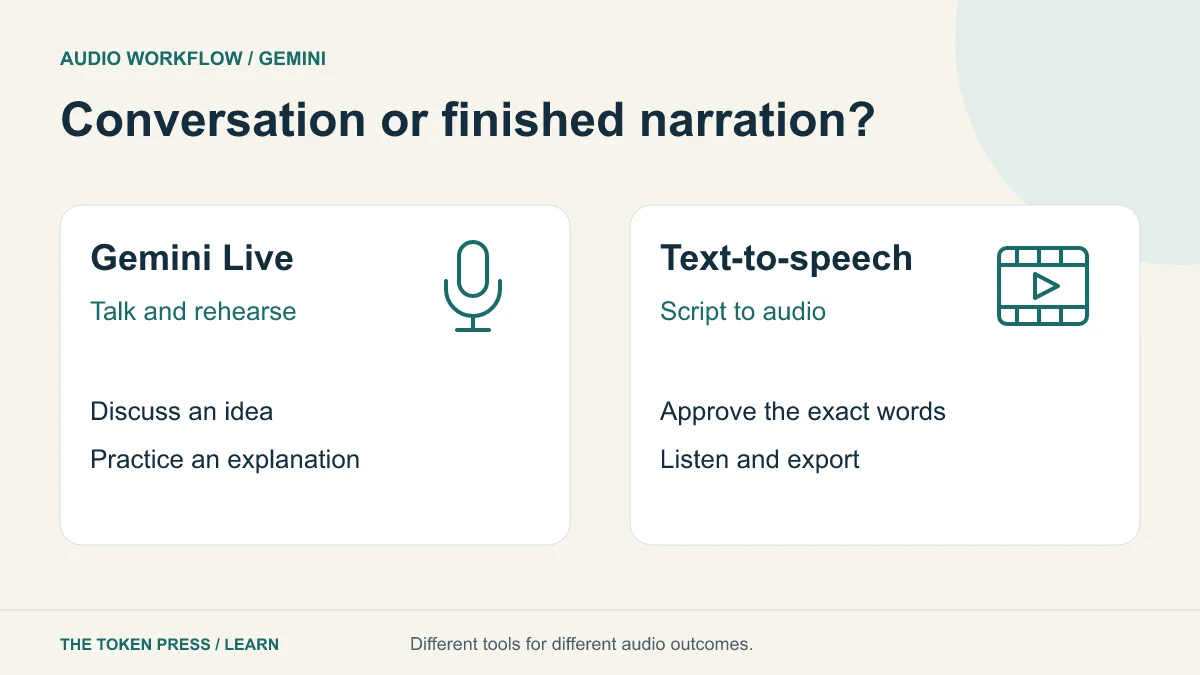
Decide whether you need a conversation or a recording
Gemini Live is designed for spoken interaction: you can brainstorm, rehearse and interrupt the conversation. Text-to-speech, or TTS, converts a prepared script into an audio output. Use the first to practice an explanation and the second when you need controlled narration for a video or lesson.
Google’s documentation explicitly distinguishes Gemini TTS from its interactive Live API. TTS accepts text and produces audio, including single- and multiple-speaker formats. A successful voice conversation does not by itself create a polished, downloadable narration track.
Rehearse an explanation with Gemini Live
On the supported mobile experience described in Google’s help, open Gemini and use Live. Availability and controls depend on the device, account and rollout. Try a short explanation, ask for one confusing point and repeat it more clearly. Do not treat confident spoken answers as verified facts.
For our workshop example, rehearse explaining what visitors should bring. Stop the conversation if it starts inventing services or making promises you have not approved. Ask for feedback on clarity, then write down the final facts yourself.
PROMPT TO ADAPT
Help me rehearse a short explanation for a fictional repair workshop. Ask what visitors should bring, then listen to my answer. Identify one confusing sentence and suggest a simpler version. Use only the facts I give you. Do not invent prices, dates, repair guarantees or safety instructions.
Write a narration script for the ear
A script for reading aloud should use short sentences and natural pauses. Expand unfamiliar abbreviations, simplify stacked numbers and remove headings that sound awkward when spoken. Keep a pronunciation list for names and specialist terms.
For practice, write 60 words and estimate the duration at 120 words per minute. The estimate is 60 ÷ 120 × 60 = 30 seconds, excluding extra pauses. Render a sample and measure it; the requested tone and actual delivery can change the result.
Mark what must be spoken exactly and what is a style instruction. Do not accidentally include production notes such as “pause here” in the intended transcript. Review names, figures and claims before they become audio.
Try the current TTS interface with a short sample
Google’s speech-generation documentation links to AI Studio for trying Gemini TTS models. As checked for this guide, it documents Gemini 3.8 Flash TTS and Flash-Lite TTS, with text input, style controls and audio output. Choose an available supported model and a voice in the current interface rather than copying an old model name into a new project.
Begin with two sentences that contain your hardest word and one number. Specify the pace and tone, listen, and revise the script if necessary. Keep a record of the selected voice and settings so later segments can be compared. Model and interface capabilities change; use the linked documentation for the current export or API procedure.
A voiceover brief you can reuse
The following is an original direction-and-script pair. Keep the delivery direction separate from the words to be spoken, using the fields supported by your chosen tool.
PROMPT TO ADAPT
Delivery: warm, clear, conversational English; moderate pace; brief pause between sentences; no dramatic sales tone.
Transcript: Welcome to our community repair workshop. Bring an item you would like us to assess, and tell us what is not working. We will explain the next step before any work begins.
Review: pronounce every word clearly and preserve the approved transcript.
Listen for errors that a transcript cannot reveal
Play the output on headphones and a phone speaker. Listen for skipped words, awkward pauses, abrupt volume changes and a pronunciation that changes the meaning. Compare the recording with the approved transcript rather than assuming the model read it perfectly.
For a two-speaker script, confirm that each line belongs to the intended speaker and the voices remain distinguishable. If you regenerate one paragraph, compare the transition with adjacent segments. A replacement that sounds fine alone may change pace or tone in the complete piece.
Create captions from the final approved audio, then proofread them. Captions based on an earlier script may drift after edits. Keep an accessible written version of important instructions.
Use voices and recordings with permission
Use an authorized voice and obtain consent before recording other people or using a voice likeness. Avoid making a synthetic voice sound like a real person endorsing a claim they did not make. Google’s Live guidance specifically advises respecting others’ privacy when including them in a session.
Review the service’s data controls before uploading private conversations or sensitive customer material. A practice script with invented details is usually sufficient for testing. Label synthetic narration where the context could otherwise mislead the audience.
A final audio delivery checklist
Export the format your destination accepts and play the saved file itself. Check that the file includes the full ending and that its duration fits the video or lesson. Keep the approved script and settings beside the master so a future correction can be made consistently.
- The spoken words match the approved facts and names.
- The pace is understandable on a phone speaker.
- There are no clipped beginnings, cut-off endings or distracting joins.
- Captions match the final audio, not an abandoned draft.
- The voice and source material are authorized for the intended use.
- The saved file plays correctly outside the generation tool.
Sources & further reading
Educational content. Examples are illustrative. Protocols, products and rules can change; consult the linked documentation for current details.